
Three ways to move
Burst mode alternates detected sounds between sides. Auto-pan moves continuously with the host tempo. Timed LFO moves while the detector is open.

AIRSCAPE AUDIO TOOLS / 001
Dynamic stereo panner
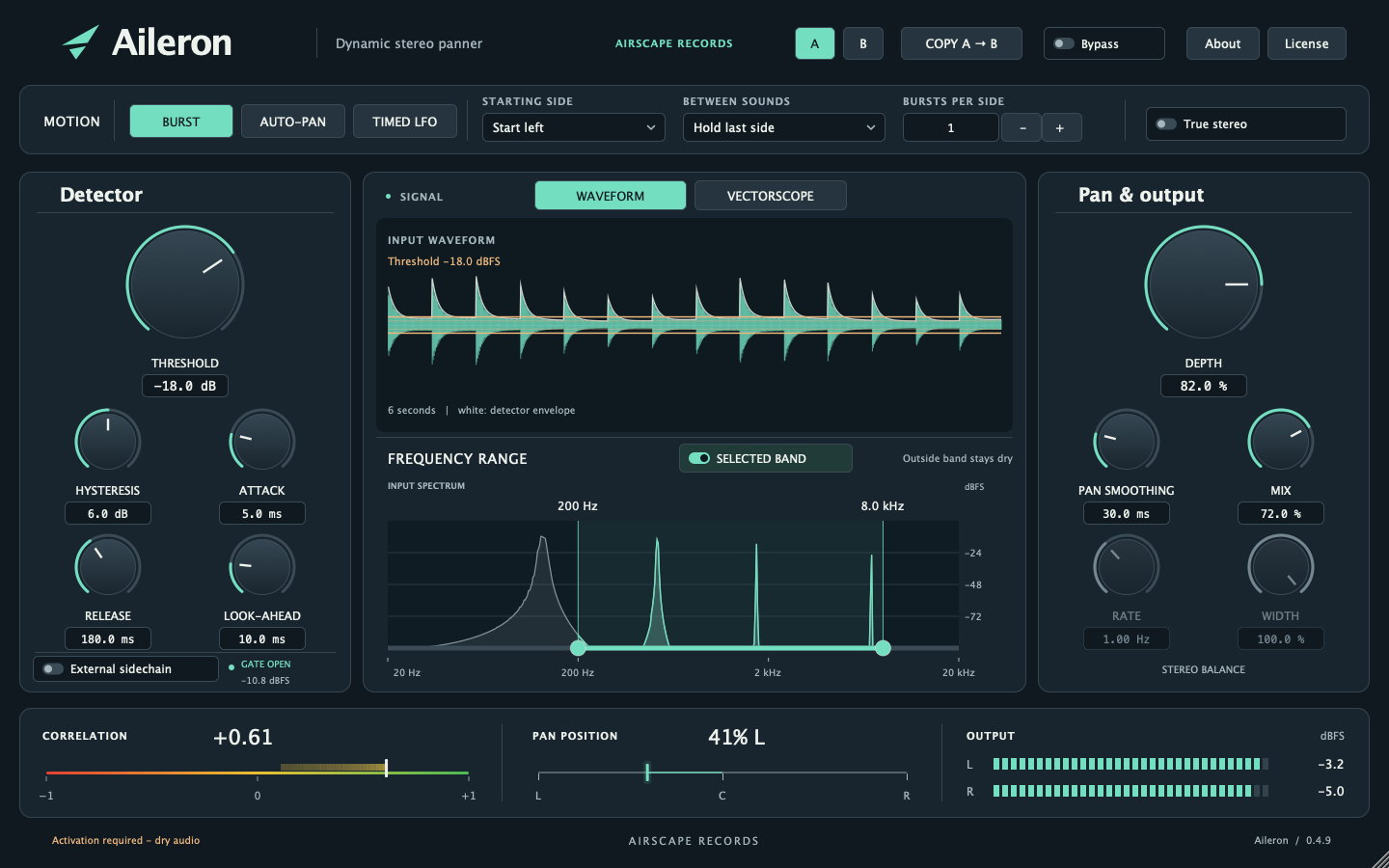
Actual plugin interface · Version 0.4.9
MOVEMENT WITH INTENTION
From alternating vocal phrases to sweeping synths and moving percussion, Aileron gives you three ways to create stereo motion—with a waveform, frequency spectrum and stereo meters to help you see what you hear.
Burst mode alternates detected sounds between sides. Auto-pan moves continuously with the host tempo. Timed LFO moves while the detector is open.
Apply the effect to a selected band from 20 Hz–20 kHz. Drag either endpoint to resize it, or sweep the selected band while preserving its width.
A timeline waveform with threshold indicators, input spectrum, vectorscope, correlation meter and output meters make the processing visible.
Use threshold, hysteresis, attack, release, up to 50 ms of look-ahead and pan smoothing to shape sharp switches or slower glides.
Choose conventional balance or True stereo panning. Adjust width in True stereo mode, blend with Mix, or use an external sidechain to trigger motion.
Switch between A and B, copy settings between slots, and recall both with your session. A built-in 15-day trial lets you evaluate the effect.
BEFORE YOU BUY
| Platform | Formats | Current status |
|---|---|---|
| macOS · Apple Silicon | AU, VST3, AAX Native | Apple Silicon only; no Intel build. |
| Windows 10+ · x64 | VST3, AAX Native | 64-bit Windows build. |
Current installers are unsigned; the macOS installer is not notarized. AAX requires Pro Tools Developer and is not approved for regular Pro Tools. Real DAW qualification remains in progress.
A 15-day local trial is available in the plugin. License activation and periodic validation require an internet connection. Please check these requirements before purchasing when sales open.
A FEW THINGS TO KNOW
When sales open, the purchase button will take you to Lemon Squeezy to complete checkout. You will browse the product here on Airscape Records.
The license allows two active devices. Installed plugin formats and DAW instances share an activation on the same computer login. You can deactivate one device online to move the activation to another.
Aileron uses a one-time, perpetual license. Final pricing will be shown when live checkout becomes available.
The local 15-day trial works offline after it has been started. Outside the trial, the current build requires internet access at startup and for periodic license validation.
The current unsigned AAX build requires Pro Tools Developer. Commercial AAX signing and regular Pro Tools support are not available yet.